Node MongoDB

Reference Link MongoDB – JWT

连接 Mongo

在 Mongo Db Atlas创建一个 collections, 生成链接

const mongoose = require('mongoose');

mongoose.connect(dbURI, {useNewUrlParse: true, useUnifiedTopology: true}).then(res => app.listen(3000)).catch(err => console.log(err))

2 定义schma model

const Schema = mongoose.Schema;
// schema 定义结构
const blogSchema = new Schema({
  title: {type: String, require: true},
  body: {type: String, require: true}
}, {timeStamps: true})

//model 操作数据
const Blog = mongoose.model('Blog', blogSchema);
module.exports = Blog;

Getting and save Data

// Blog import 上面 
app.get('/add-blog', (req, res) => {
  const blog = new Blog({
     title: 'xx',
     body: 'this is body'
  })
  blog.save().then()
})

// get all blog
app.get('all-blogs', (req, res) => {
   Blog.find().then(result => res.send(result))
})
// get one 
Blog.findById('xxxx').then

babel 解析

1. @babel/plugin-transform-runtime
在转换 ES2015 语法为 ECMAScript 5 的语法时,babel 会需要一些辅助函数,例如 _extend。babel 默认会将这些辅助函数内联到每一个 js 文件里,这样文件多的时候,项目就会很大,所以 babel 提供了 transform-runtime 来将这些辅助函数“搬”到一个单独的模块 babel-runtime 中,这样做能减小项目文件的大小。

“plugins”: [
[
“@babel/plugin-transform-runtime”,
{
“absoluteRuntime”: false,
“corejs”: false,
“helpers”: true,
“regenerator”: true,
“useESModules”: false
}
]
]
}

2. babel-polyfill
Babel默认只转换新的JavaScript句法(syntax),而不转换新的API,比如Iterator、Generator、Set、Maps、Proxy、Reflect、Symbol、Promise等全局对象,以及一些定义在全局对象上的方法(比如Object.assign)都不会转码。
举例来说,ES6在Array对象上新增了Array.from方法。Babel就不会转码这个方法。如果想让这个方法运行,必须使用babel-polyfill,为当前环境提供一个垫片

webpack require 和 import 详解 / hash

import的加载是加载的模块的引用。而import()加载的是模块的拷贝,就是类似于require(),怎么来说明?看下面的例子
module.js 文件:

[cc lang=”js”]export let counter = 3;
export function incCounter() {
counter++;
}[/cc]

main.js 文件:

[cc lang=”js”]let filename = ‘module.js’;
import(‘./’ + filename).then(({counter, incCounter})=>{
console.log(counter); //3
incCounter();
console.log(counter); //3
}); [/cc]

[cc lang=”js”]import {counter, incCounter} from ‘./module.js’;
console.log(counter); //3
incCounter();
console.log(counter); //4[/cc]

commonjs同步语法
经典的commonjs同步语法如下:

var a = require(‘./a’);
a.show();

commonjs异步加载
[cc lang=”js”]
require.ensure([ ], function(require){
var list = require(‘./list’);
list.show();
}, ‘list’); // 第三个参数 可以有可无 是给chunk命名

[/cc]
此时list.js会被打包成一个单独的chunk文件,大概长这样 :list.fb874860b35831bc96a8.js

如果你在require.ensure的函数中引用了两个以上的模块,webpack会把它们打包在一起,比如:
[cc lang=”js”]require.ensure([ ], function(require){
var list = require(‘./list’);
list.show();
var edit = require(‘./edit’);
edit.display();
}, ‘list_and_edit’);
[/cc]
list.js和edit.js将会被打包成一个文件,并命名为list_and_edit.js。这就需要根据你的实际情况来衡量了,如果你不希望打包在一起,只能写两个require.ensure分别引用这两个文件。

commonjs预加载懒执行
在上面的用法中,我们给require.ensure的第一个参数传了空数组,实际上这里是可以接收模块名称的,作用就是实现预加载懒执行。用法如下:
先下载 后执行
[cc lang=”js”]
require.ensure([ ‘./list’], function(require){
var list = require(‘./list’);
list.show();
});
执行到这里的时候list.js会被浏览器下载下来,但是并不会执行list.js模块中的代码,真正进行evaluate的时候是到了后面这句var list = require(‘./list’)
[/cc]

webpack自带的require.include
require.include是webpack自己提供的,并没有什么规范做后台,所以是个小角色。它可以实现上面是预加载功能,而不用把模块写在数组中,用法如下:
[cc lang=”js”]
require.ensure([ ], function(require){
require.include(‘./preview’); //加载
let p = require(‘./preview’); //执行
p.getUrl(); //使用
}, ‘pre’);
[/cc]

AMD异步加载
webpack既支持commonjs规范也支持AMD规范,这就意味着AMD的经典语法是可以正常使用的,如:

[cc lang=”js”]
require([ ‘./list’], function(list){
list.show();
});
//多文件
require([ ‘./list’, ‘./edit’], function(list, edit){
list.show();
edit.display();
});
[/cc]

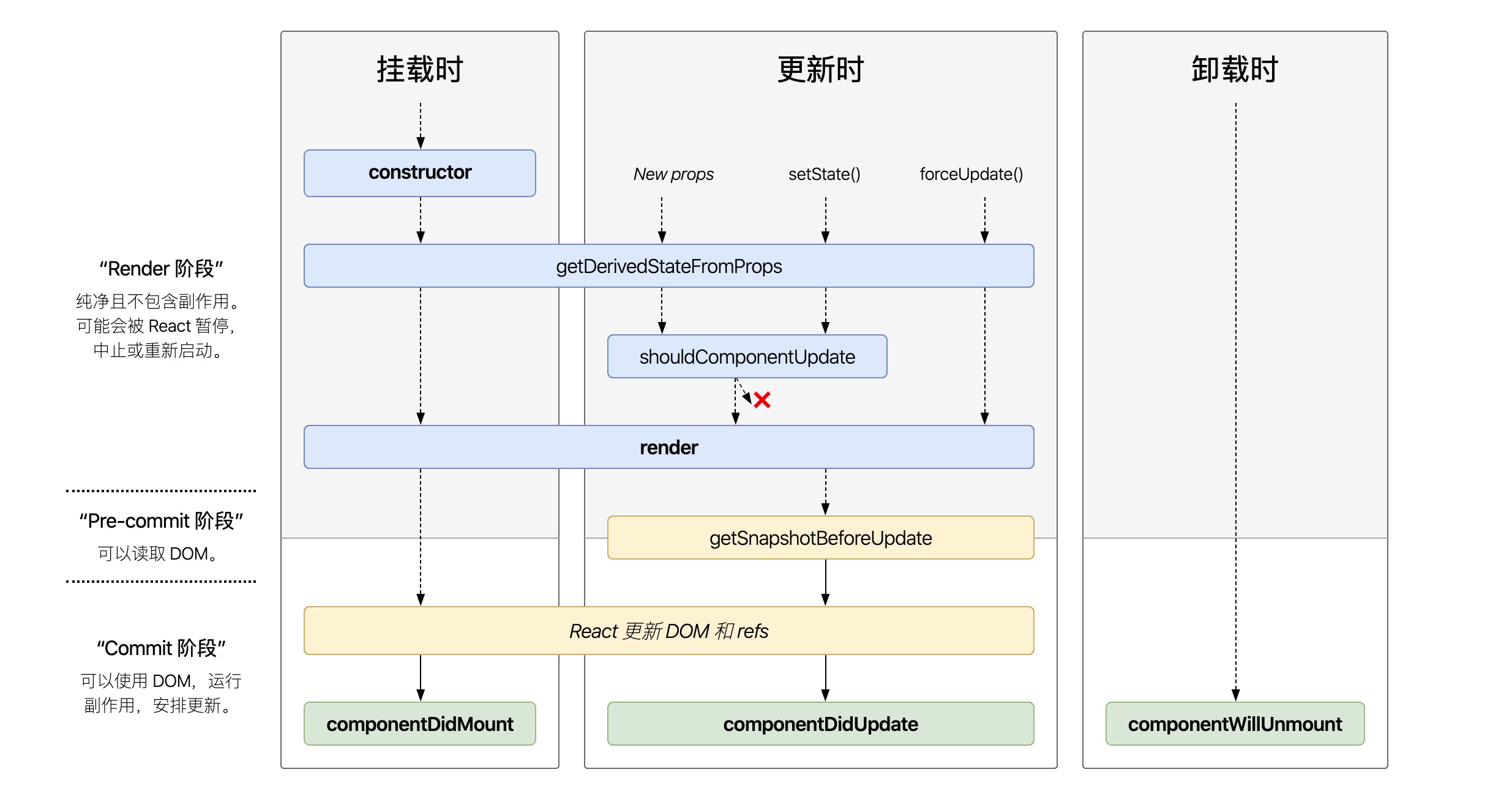
可能用不到派生 state ,可控 组件,非可控组件

什么时候用到派生

  • 1,直接复制 props 到 state 上;
  • 2,如果 props 和 state 不一致就更新 state。

如果你只是为了缓存(memoize)基于当前 props 计算后的结果的话, 请看 https://www.xmetal.cc/?p=1315

问题 :针对输入 组件

  1. 父组件更新, props 改变, 会重置 state ,我们输入的所有东西都会丢失
  2. if (nextProps.email !== this.props.email) {}只要 props.email 改变,就改变 state, 这样不会丢掉
  3. 上面会导致父组件格式如果是[{email:xxx, email:xxx}] , 子组件的input 就不能更新

设计组件时,重要的是确定组件是受控组件还是非受控组件

不要直接复制(mirror) props 的值到 state 中,而是去实现一个受控的组件,然后在父组件里合并两个值。比如,不要在子组件里被动的接受 props.value 并跟踪一个临时的 state.value,而要在父组件里管理 state.draftValue 和 state.committedValue,直接控制子组件里的值。这样数据才更加明确可预测

建议:完全可控的组件

function EmailInput(props) {
  return <input onChange={props.onChange} value={props.email} />;
}

建议:有 key 的非可控组件

在这密码管理器的例子中,为了在不同的页面切换不同的值,我们可以使用 key 这个特殊的 React 属性。当 key 变化时, React 会创建一个新的而不是更新一个既有的组件。 Keys 一般用来渲染动态列表,但是这里也可以使用

class EmailInput extends Component {
  state = { email: this.props.defaultEmail };

  handleChange = event => {
    this.setState({ email: event.target.value });
  };

  render() {
    return <input onChange={this.handleChange} value= 
     {this.state.email} />;
  }
}
//每次 ID 更改,都会重新创建 EmailInput ,并将其状态重置为最新的 defaultEmail 值。
<EmailInput
  defaultEmail={this.props.user.email}
  key={this.props.user.id}
/>

选项一:用 prop 的 ID 重置非受控组件

如果某些情况下 key 不起作用(可能是组件初始化的开销太大),一个麻烦但是可行的方案是在 getDerivedStateFromProps 观察 userID 的变化:

class EmailInput extends Component {
  state = {
    email: this.props.defaultEmail,
    prevPropsUserID: this.props.userID
  };
//使用了 getDerivedStateFromProps,用 componentWillReceiveProps 也一样。
  static getDerivedStateFromProps(props, state) {
    // 只要当前 user 变化,
    // 重置所有跟 user 相关的状态。
    // 这个例子中,只有 email 和 user 相关。
    if (props.userID !== state.prevPropsUserID) {
      return {
        prevPropsUserID: props.userID,
        email: props.defaultEmail
      };
    }
    return null;
  }

  // ...
}

选项二:使用实例方法重置非受控组件

更少见的情况是,即使没有合适的 key,我们也想重新创建组件。一种解决方案是给一个随机值或者递增的值当作 key,另外一种是用实例方法强制重置内部状态:

refs 在某些情况下很有用,比如这个。但通常我们建议谨慎使用。即使是做一个演示,这个命令式的方法也是非理想的,因为这会导致两次而不是一次渲染。

export default class AccountsList extends Component {
  inputRef = React.createRef();

  state = {
    selectedIndex: 0
  };

  handleChange = index => {
    this.setState({ selectedIndex: index }, () => {
      const selectedAccount = this.props.accounts[index];
    this.inputRef.current.resetEmailForNewUser(selectedAccount.email);
    });
  };

  render() {
    const { accounts } = this.props;
    const { selectedIndex } = this.state;
    const selectedAccount = accounts[selectedIndex];
    return (
      <Fragment>
        <UncontrolledEmailInput
          defaultEmail={selectedAccount.email}
          ref={this.inputRef}
        />
        <p>
          Accounts:
          {this.props.accounts.map((account, index) => (
            <label key={account.id}>
              <input
                type="radio"
                name="account"
                checked={selectedIndex === index}
                onChange={() => this.handleChange(index)}
              />{" "}
              {account.name}
            </label>
          ))}
        </p>
      
      </Fragment>
    );
  }
}
//子组件
class EmailInput extends Component {
  state = {
    email: this.props.defaultEmail
  };

  resetEmailForNewUser(newEmail) {
    this.setState({ email: newEmail });
  }

  // ...
}

Vue 插件按需引入 之 babel-plugin-component

1. npm 安装 babel-plugin-component
.babelrc plugins 配置
[cc lang=”js”]
[
“component”,
{
“libraryName”: “element-ui”,
“styleLibraryName”: “theme-chalk”
}
][/cc]
所以如果在.babelrc文件配置过styleLibraryName属性的,不要在全局引入element的css样式了

main.js 里 按需引入
[cc lang=”js”]
import Vue from ‘vue’;
import {
Dialog,
Autocomplete,
Dropdown,

} from ‘element-ui’;
Vue.use(Pagination);
Vue.use(Dialog);
Vue.use(Autocomplete);[/cc]