优化 JavaScript 执行

  • 对于动画效果的实现,避免使用 setTimeout 或 setInterval,请使用 requestAnimationFrame。
  • 将长时间运行的 JavaScript 从主线程移到 Web Worker。
  • 使用微任务来执行对多个帧的 DOM 更改。
  • 使用 Chrome DevTools 的 Timeline 和 JavaScript 分析器来评估 JavaScript 的影响
  •  

使用 requestAnimationFrame 来实现视觉变化

/**
 * If run as a requestAnimationFrame callback, this
 * will be run at the start of the frame.
 */
function updateScreen(time) {
  // Make visual updates here.
}

requestAnimationFrame(updateScreen);

保证 JavaScript 在帧开始时运行的唯一方式是使用 requestAnimationFrame。

下次重绘之前执行 callback, callback 会接受一个当前执行的时间戳

某些框架或示例可能使用 setTimeout或 setInterval 来执行动画之类的视觉变化,但这种做法的问题是,回调将在帧中的某个时点运行,可能刚好在末尾,而这可能经常会使我们丢失帧,导致卡顿。

事实上,jQuery 目前的默认 animate行为是使用 setTimeout!强烈建议您打上补丁程序以使用 requestAnimationFrame

降低复杂性或使用 Web Worker

var dataSortWorker = new Worker("sort-worker.js");
dataSortWorker.postMesssage(dataToSort);

// The main thread is now free to continue working on other things...

dataSortWorker.addEventListener('message', function(evt) {
   var sortedData = evt.data;
   // Update data on screen...
});

并非所有工作都适合此模型:Web Worker 没有 DOM 访问权限。如果您的工作必须在主线程上执行,请考虑一种批量方法,将大型任务分割为微任务,每个微任务所占时间不超过几毫秒,并且在每帧的 requestAnimationFrame 处理程序内运行。

var taskList = breakBigTaskIntoMicroTasks(monsterTaskList);
requestAnimationFrame(processTaskList);

function processTaskList(taskStartTime) {
  var taskFinishTime;

  do {
    // Assume the next task is pushed onto a stack.
    var nextTask = taskList.pop();

    // Process nextTask.
    processTask(nextTask);

    // Go again if there’s enough time to do the next task.
    taskFinishTime = window.performance.now();
// 渲染之前如果 js 执行时间小于3 可以在执行 下个 taskList 任务,如果大于3 就 放在下次渲染前执行   } while (taskFinishTime - taskStartTime < 3);   if (taskList.length > 0)     requestAnimationFrame(processTaskList); //递归 执行下次任务 }

此方法会产生 UX 和 UI 后果,您将需要使用进度或活动指示器来确保用户知道任务正在被处理。在任何情况下,此方法都不会占用应用的主线程,从而有助于主线程始终对用户交互作出快速响应。

避免微优化 JavaScript

知道浏览器执行一个函数版本比另一个函数要快 100 倍可能会很酷,比如请求元素的offsetTop比计算getBoundingClientRect()要快,但是,您在每帧调用这类函数的次数几乎总是很少,因此,把重点放在 JavaScript 性能的这个方面通常是白费劲。您一般只能节省零点几毫秒的时间。

如果您开发的是游戏或计算开销很大的应用,则可能属于本指南的例外情况,因为您一般会将大量计算放入单个帧,在这种情况下各种方法都很有用。

简而言之,慎用微优化,因为它们通常不会映射到您正在构建的应用类型。
chrome devtool

breakpoint

1 调试可以忽略代码

  1. Blackbox a script from the Editor pane :blackbox source 右击代码 blackbox script
  2. Blackbox a script from the Call Stack pane
  3. Blackbox提供了这个便利功能,当你把不需要调试的代码加入Blackbox时候,调试的时候便会自动绕过这些文件,断点也不会调入黑盒中
  4. restart frame : 右击 call stack里第一个函数 ,选择 restart frame 可以重新 debugger 函数
  5. breakpoint continue to here Add conditional breakpoint 设置条件断点
  6. xhr fetch breakpoints 添加 url 关键字, 有访问就会打端点
  7. Dom breakpoints Dom 属性改变 删除 内容改变 都可以打断点
  8. 在 scope 改 变量数据

performance

看每秒的帧数, 如果FPS 是红线说明 用户不到60FPS

解决问题

看summary 扇形图 看看哪个时间长 然后减少它的时间

  1. Expand the Main section. DevTools shows you a flame chart of activity on the main thread, over time. main 里每一个bar 代表一个事件,事件下面是当前bar的子事件
  2. Animation Frame Fired (估计每个screenshot 是一帧) 当你在main 里 看到 一个 动画帧里有红色三角行,就说明这个bar当前事件有警告, 点开mian 里的 bar 事件,然后点击 summary 的 reveal link, 再点击关联文件就到 source 里了
  3. 减少页面re-layout 重绘,用flex 布局
  4. 坚持仅合成器的属性和管理层计数
  • 坚持使用 transform 和 opacity 属性更改来实现动画。
  • 使用 will-change 或 translateZ 提升移动的元素。
  • 避免过度使用提升规则;各层都需要内存和管理开销。
.moving-element {
  will-change: transform;
}
.moving-element {
  transform: translateZ(0);
}

https://web.dev/rail/

英文词的标准缩写 abbreviation

The following standard word abbreviations should be used in naming records, fields, and SQRs:

Word(s) Abbreviation Description
Abbreviate
Abbreviation
ABRV
Academic ACAD
Accept
Acceptance
Accepted
ACPT
Access ACCS
Accident ACDNT
Accomplish
Accomplishment
Accomplishments
ACMP
Account* ACCT*
Accounting* ACCTG*
Accounts Payable
Advanced Placement
AP
Accounts Receivable AR
Accredited ACRD
Accrual ACRL
Accumulated* ACCUM*
Accumulation
Accumulative
ACUM
Achieve
Achievement
ACHV
Acquisition* ACQ*
Act
Active
Activity
American College Test
ACT
Action* ACTN*
Actual ACTL
Add
Added
ADD
Additional* ADDL*
Address* ADDR* Narrative data which describes a person, place or thing’s location
Ad hoc ADHC
Adjudicate
Adjudicated
Adjudication
ADJD
Adjusted Gross Income AGI
Adjustment* ADJ*
Administered
Administrated
Administration
ADM
Admissible
Admission
ADMS
Admittance
Admitted
ADMT
Advanced Placement
Accounts Payable
AP
Advice ADVC
Affiliation AFFL
After AFT
Age AGE
Agency AGCY
Agent AGNT
Aid AID
Alien ALN
All ALL
Allocate
Allocation*
ALLOC*
Alpha ALPH
Alter
Alternate
ALT
Alumni
Alumnus
ALMN
AM AM “Ante Meridiem” (morning)
American College Test
Act
Active
Activity
ACT
Amount* AMT* Monetary value(s)
Analysis ANLS
Annual* ANNL*
Anonymous ANON
Answer ANS
Apartment APT
Appeal
Appealed
APEL
Applicant* APP*
Application* APPL*
Appointment APPT
Approval
Approve
APRV
Area AREA
Array ARAY
Arrears ARRS
Ascending ASC
Assign
Assigned
Assignment
ASGN
Association ASSC
Assumption ASMP
Athlete
Athletic
ATHL
Attach ATCH
Attempt ATMPT
Attend
Attendance
ATND
Attention ATTN
Attribute ATTR
Audit
Audited
ADT
Authority
Authorize
AUTH
Auxiliary AUX
Availability
Available
AVL
Average AVG The mean of two or more numbers
Average Cumulative Grade ACG
Award
Awarded
AWRD
Balance* BAL* The net value (balance) of an account
Bank BNK
Bargain BARG
Base
Basic
BAS
Batch BTCH
Before BEF
Begin
Beginning
BEGN
Beginning of Term BOT
Benefits BEN
Bid BID
Bill
Billing
BILL
Billing and Receivables System BRS
Birth BRTH
Board BRD
Break BRK
Budget
Budgetable
BUD
Budget Balance Account BBA
Build
Building
BLD
Business BUS
Business Unit* BU*
Buy
Buyer
BUY
Calculate
Calculated
Calculation*
CALC*
Calendar* CAL*
Call CALL
Campaign CMPN
Campus CMPS
Cancel
Canceled
CAN
Capacity CAP
Capitalization CPLZ
Card CRD
Career CAR
Carrier CRIR
Cartridge CART
Case CSE
Cash CSH
Catalog CTLG
Category* CATG*
Census CENS
Center CTR
Certificate
Certification
CERT
Change
Changed
CHG
Chapter CHAP
Charge CRG
Chartfield CHARTF
Check
Checked
CHK
Citizen
Citizenship
CTZN
City CTY
Class CLAS
Clear
Cleared
CLR
CLEP CLEP
Close CLO
Club CLB
COBRA* CBR*
Code* CD* Data which represents encoded values (translate or code table)
Collect
Collection
CLCT
College COLG
Column CLMN
Combination
Combine
COMB
Command CMD
Comment CMT An explanatory, illustrative or critical note, remark or observation
Committee CMMTTEE
Company* CO*
Comparative* COMPA*
Competitor CPTR
Complete
Completion
Compliance
CMPL
Component CMPT When the meaning is “part”, use abbreviation “PRT”.
Composite
Compensation
COMP
Conditional COND
Confidential CNFD
Confirm
Confirmation*
CONF*
Constant CNST
CST
Data which is unchanging or invariable
Contact CTCT
Continue
Continuing
Continuous
CONT
Contract
Contractor
CNTR
Control* CNTL*
Conversation* CONVR*
Conversion*
Convert*
Converted
CNV*
Correspondence CRSP
Cost COST
Count
Counter
CNT A number of people or things that have been “counted”, such as inventory cycle count
Country CTRY
County CNTY
Course* CRSE*
Coverage* COVRG*
Create CRE
Credential CRDL
Credit* CR*
CRDT
Use “CR” for field names relating to financial data
Use “CRDT” for field names relating to academic work
CREF CREF
Cross CRS
Cross List
Cross Listed
XLST
Cross Reference XREF
Cumulative CUM
Currency* CURR*
Current* CUR*
Cursor CRSR
Custodian CSTN
Customer* CUST*
Daily DLY
Data DATA
Data Processing DP
Date* DT* A calendar day, month, and year (including century)
Date-Time Stamp DTTM
Day* DD*
DY*
A day of the week (Sunday, Monday, etc.)
Dead
Death
Deceased
DEAD
Debit* DR*
Decimal DEC
Deduct
Deduction*
DED*
Default* DFLT*
Deficit DFCT
Definition* DEFN*
Degree DEG
Delete DEL
Deliver
Delivery
DLVR
Demo DMO
Dental DNTL
Department* DEPT*
Department of Motor Vehicles DMV
Dependency
Dependent*
Depends
DEP*
Deposit DPST
Depreciation* DEPR*
Description* DESCR*
DSC
Narrative data which translates a code or number. When a suffix, use “_DSC” (see Standard Field Name Suffix table).
Design DSGN
Destination* DEST*
Detail* DETL*
Develop
Development
Deviation
DEV
Difference
Differential
DIFF
Digit DGT
Direct
Direction
Directional
DIR
Disability
Disabled
DISA
Disbursed
Disbursement
DSB
Discount* DISC*
Displacement DSPL
Display DISP
Disposition DSP
Distribute
Distribution*
DIST*
District DSTR
Division DIV
Division of Continuing Education DCE
Document DOC
Donor DONR
Down DN
Drive
Driver
DRV
Drop DRP
Due DUE
Duplicate*
Duplication
DUP*
Each EA
Early ERLY
Earn
Earned
Earnings*
EARN*
Earned Income Credit EIC
Educate
Education
EDU
Effect
Effective*
EFF*
Effective Date* EFFDT*
Effective Date Sequence* EFFSEQ*
Effort EFRT
Elect
Elected
Elective
ELCT
Electronic Data Interchange EDI
Electronic Funds Transfer EFT
Electronic Mail EM
Eligibility*
Eligible
ELIG*
Emergency EMRG
Emphasis EMPH
Employee* EE*
EMPL
Employee ID* EMPLID*
Employer* ER*
Employment EMPLMT
Encumber
Encumbrance
ENCB
End
Ending
END
End of Term EOT
Endorse
Endorsement
ENDR
Endorsement ENDR
Endow
Endowment
ENDW
Engineer
Engineering
ENGN
English ENGL
Enrichment ENRCH
Enrollment ENRL
Enter
Entered
Entry
ENTR
Entitle
Entitlement
ENTL
Equal
Equality
Equivalence
Equivalent
EQ
Equal Employment Opportunity
Equal Opportunity
EEO
Equip EQP
Error ERR
Establishment ESTB
Ethnic ETHN
Evaluation
Evaluator
EVAL
Event EVNT
Exam EXM
Exception EXCP
Exclude
Exclusion
EXCL
Execute
Execution
EXEC
Exempt
Exemption
EXMT
Expect
Expected
EXPC
Expected Family Contribution EFC
Expedite XPDT
Expense
Export
Express
EXP
Experimental EXPM
Expiration
Expire
EXPR
Export
Expense
EXP
Extend
Extended
Extension
EXT
External EXTR
Facility FCLT
Faculty FAC
Family FMLY
Family Eduaction Rights and Privacy Act FERPA
Fast FST
Father FATH
Federal FED
Federal Labor and Security Act FLSA
Fee FEE
Feet
Full Time
FT
FICA FICA
Field
Fields
FLD
File FILE
Final FNL
Financial* FIN*
Financial Aid FA
Fine FINE
First FRST
Fiscal FISC
Fiscal Year FY
Fiscal Year to Date FYTD
Fix
Fixed
FIX
Flag FLG
SW
Data which functions as a flag or indicator. Used with only two possible states/conditions. Data should normally be “Y” or “N”.
Flexible Spending Account FSA
Floor FLR
For FOR
Foreign FGN
Foreign Key FK
Form FRM
Format FMT
Former FORMR
Free FREE
Free Application for Federal Student Aid FAFSA
Free on Board FOB
Freeze
Frozen
FRZ
Frequency* FREQ*
Fresh
Freshman
FRSH
From FR
Fulfill
Fulfilled
FULF
Full Time FT
Full Time Equivalent FTE
Function
Functional
FCN
Fund
Funding
FUND
Future FUT
Garnishment* GARN*
General GENL
General Education Degree GED
General Ledger GL
Geographic
Geography
GEOG
Gift GFT
Global GLBL
Government GOVT
Grade GDE
GRD
A value assigned to reflect performance or position on a scale
Grade Point Average GPA
Graduate GRAD
Grant
Granted
GRNT
Gross GROS
Group GRP
Guarantee GUAR
Guaranteed Student Loan GSL
Guest GST
Handicap
Handicapped
HAND
Head HEAD
Header* HDR*
Health HLTH
Held
Hold
HLD
Help HLP
Hierarchy HIER
High H Normally used in conjunction with another word (i.e., High School abbreviated as “HS”).
High School HS
High School Services HSS
Higher Education HED
Highway HWAY
Hire HIRE
History HST
Home HM
Honor HONR
Honor Society HSC
Hospital HOSP
Hour HH A duration of time expressed in hours
Hourly HRLY
Hours* HRS*
House
Housing
HSE
How HOW
Human Resources HR
Human Resource System HRS
Identification
Identifier*
Indicator
ID* Alphanumeric data which identifies a person, place, or thing
Image IMG
Immune
Immunization
IMUN
Impact IMPC
Implementation IMPL
Import IMP
Import/Export IMPEXP
Inch IN
Include INCL
Income INCM
Increase
Increment
INCR
Index INDX
Indicator ID
IND
Individual INDV
Individual Student Information Report ISIR
Information INFO
Initial
Initialize
INIT
Injury* INJ*
Inoculation INOC
Input INPT
Inquiry INQ
Insert ISRT
Institution INST
Instruction
Instructional
Instructor
ISTR
Instructional Need Analysis System INAS
Insurance INS
Inter-Unit* IU*
Interest INT
Interface* INTFC*
Internal INTR
International INTL
Interval INVL
Interview
Interviewer
INTV
Invent INVN
Inventory INV
Investment* INVEST*
Invitation
Invite
INVT
Invoice INVC
Issue
Issued
ISS
Item ITM
Job JOB
Journal* JRNL*
Junior JR
Junior Science JS
Key KEY
Label LBL
Labor LBR
Laboratory LAB
Language LNG
Last
List
LST
Late LATE
Latitude LAT
Layoff LAYF
Leave LV
Lecture LCTR
Ledger* LED*
Legal LGL
Lender LNDR
Length* LEN*
Letter LTR
Level LVL
Liaison LISN
Liberal Education LBD
Library LIB
License LIC
License Plate Number LIC_PLTE_NBR
Life LIFE
Limit* LIM*
Line*
Loan
LN*
Link
Linked
LNK
Liquid LIQ
List
Last
LST
Literal LTRL
Load LOAD
Loan
Line*
LN
Locate
Location*
LOC*
Lock LK
Locker LKR
Log LOG
Log on LOGON
Long
Longest
LONG
Long Term Care LTC
Long Term Disability LTD
Longitude LON
Lot LOT
Low LOW
Mail
Mailer
Mailing
MAIL
Maintenance* MAINT*
Major MJR
Make MK
Manager MGR
Map MAP
Marital MRTL
Message Agent Server MAS
Mask MSK
Master Academic Records System MARS
Match
Matching
MTCH
Math MTH
Matriculated
Matriculation
MTRC
Maximum* MAX*
Medical
Medicinal
MED
Meet
Meeting
MT
Member MBR
Membership MSHP
Memo
Memorandum
MMO
Memorial MEMR
Merchandise MERCHNDS
Merchant MERCH
Merit MERT
Message
Messages*
MSG*
Meter MTR
Method METH
Microfilm MFILM
Middle MID
Military MIL
Minimum* MIN*
Minor MINR
Minute MNT
MM
A duration of time expressed in minutes
Miscellaneous MISC
Mode MDE
Modification
Modifier
MOD
Monetary
Money
MONY
Month* MM*
MN*
A calendar month in numeric form (e.g., 01=January)
Month-to-Date* MTD*
More MORE
Mother MOTH
Move MOVE
Multiple MULT
Name NM
NME
Word(s) by which a person, place or thing is commonly known
National NATL
National Association of College and University Business Officers NACUBO
National Student Loan Direct System NSLDS Commonly known as the “Perkins Loan”
Navigation NAV
New NEW
Next NXT
Next of Kin NOK
No Charge NC
No Credit NOCR
No Print NPRT
Nominal NOM
Non NON
Non-Personal Services NPS
Not NOT
Not Applicable NA
Note
Notice
Notification
Notify
NOTE
Number*
Numeric
NBR* Numeric data which identifies a person, place, or thing
Object
Objective
OBJ
Occupation OCP
Occurs OCC
Offer
Offered
OFFR
Office OFFC
Officer OFCR
Official OFCL
Old OLD
Online ONLN
Open OPN
Operator* OPR*
Option
Optional
Options
OPT
Order ORDR
Organization
Organize
ORG
Orientation ORNT
Origin
Original
Origination
ORIG
Other OTHR
Out OUT
Over OVR
Overhead OH
Override OVRD
Overtime OT
Own
Owned
OWN
Owner OWNR
Packaged PACK
Paid PAID
Paper PPR
Parameter* PARM*
Parent PAR
Parity
Priority
PRTY
Park PRK
Part
Partial
PRT
Part Time PT
Participation PRTP
Pass
Passed
PASS
Past PAST
Patron PTRN
Pay
Payable
Payment
PAY
Payroll PYRL
Pedestrian PED
Pell (Pell Grant) PEL
Pending PEND
Pension PENS
Percent*
Percentage
Percentile
PCT* Part of a whole expressed in hundredths
Period* PD*
Period-to-Date* PTD*
Perkins Loan NSLDS Common name for National Student Loan Direct System
Permanent PERM
Permit PRMT
Person PERS
Personal
Personnel
PSNL
Personal Identification PIN
Personnel Action Notification PAN
Phone PHN
Physics PHYS
Place PLCE
Plan PLN
Plate PLTE
Pledge PLDG
PM PM “Post Meridiem” (afternoon)
Point PNT
Policy PLCY
Position* POSN*
Post
Posted
POST
Postal PSTL
Potential POTN
Predicted PRED
Preference
Preferred
PREF
Prefix PRFX
Premium PREM
Prerequisite PREQ
Prescribed PSCR
Presentation PRST
President PRES
Previous
Prior
PREV
Price PRC
Price Level PL
Primary PRIM
Primary Key PK
Principal
Principle
PRIN
Principal Investigator PI
Print
Printed
PRN
Prior
Previous
PREV
Priority
Parity
PRTY
Probation
Problem
PROB
Procedure
Process
PROC
Profession
Professional
PRFS
Proficiency PRFC
Profile* PROF*
Program PROG
Project
Projected
PROJ
Promissory PRMS
Promotion PROM
Proposal PRPS
Prospect PRSP
Province PRVN
Purchase PUR
Purchase Order PO
Purge PRG
Purpose PURP
Qualitative
Quality
QAL
Quantitative
Quantity*
QTY* A number of things other than money
Quantity-to-Date
Quarter-to-Date*
QTD*
Quarter QTR
Question QSTN
Race RACE
Range RNG
Rank RNK Relative standing or position
Rate* RT* Numeric value expressing amount per some unit of coverage
Read
Reading
READ
Real
Reallocation
REAL
Reason* RSN*
Recall RCL
Receipt RCPT
Receive
Received*
RECV*
Receiver RCVR
Recharge RCHG
Recognition
Recognize
RECG
Recommend RCMD
Reconciliation* RECON*
Record* REC*
Recreate
Recreation
RECR
Recruit
Recruiting
RCRT
Reduce
Reduced
Reduction*
RED*
Refer
Reference*
Referral
Referred
REF*
Refund RFND
Regional RGNL
Registrar REGR
Registration REG
Reject
Rejection
RJCT
Relate
Relation
Relationship
RLAT
Release RLSE
Religion
Religious
RELG
Remaining RMNG
Reminder RMDR
Renewal RNWL
Repeat
Repeatable
Repeated
REPT
Replace
Replaced
REPL
Reply RPLY
Report* RPT*
Request*
Requested
Require
Required*
Requisition*
REQ*
Requirements* RQMT*
Research RES
Reserve
Reserved
RSRV
Reserve Officers Training Corps ROTC
Residence
Residency
Resident
RSDT
Resign RSGN
Resource RSRC
Response RESP
Restart RST
Restock RSTK
Restrict
Restricted
Restrictions
RSTR
Result RSLT
Retire*
Retirement*
RET*
Retroactive RETR
Return RTN
Revenue REV
Review RVW
Revision REVS
Revoke REVK
Roll RL
Roll up RLUP
Room RM
Route ROUT
Row ROW
RSVP RSVP French abbreviation meaning “please reply”
Run RUN
Run Control RUNCTL
Salary* SAL*
Sale SALE
Salutation SLTN
Same SM
Save SAVE
Scale SCAL
Schedule*
Scheduled
Scheduling
SCHED*
Scholar
Scholarship
SCHLR
Scholastic
School
SCHL
Scholastic Aptitude Test SAT
Science SCI
Score SCR A number that expresses merit or performance
Screen SCRN
Search SRCH
Second SCND
SS
Use “SCND” for field names relating to number two in a countable series
Use “SS” for field names relating to a duration of time expressed in seconds
Section SCTN
Secure
Security*
SEC*
Segment SEG
Select*
Selection
Selective
SEL*
Semester SEM
Semi Finalist SEMF
Senate
Senator
SEN
Send SND
Senior SR
Sent SNT
Separate SEPR
Sequence* SEQ*
Serial SERL
Service SERV
Session* SESSN*
Sex SEX
Sharing SHR
Sheet SHET
Shelter SHLT
Shift SHFT
Shipping SHIP
Short SHRT
Sign SGN
Simulated SIM
Site SITE
Size SZ
Skill SKL
Skip SKP
Social
Society
SOC
Social Security Number SSN
Soft SFT
Solid SLID
Sophomore SOPH
Sort SRT
Source SRC
Special
Specialty
SPCL
Specific
Specification
SPEC
Sponsor
Sponsored
SPON
Sports SPRT
Spouse SPSE
Square SQ
Stack STCK
Staff STF
Stage STG
Stamp STMP
Standard STD
Standard Deviation STDV
Start
Starting
STRT
State ST
Statement STMT
Static STC
Statistics* STAT*
Status STS
Step STP
Stipend STPD
Stock STK
Stop STOP
Street STR
String STRG
Structure STRC
Student STU
Student Academic Records SAR
Student Credit Hour SCH
Study STDY
Subcampaign SCMP
Subject SUBJ
Subordinate SUB
Subsidiary SUBS
Suffix SFX
Summation
Summary*
SUM*
Supervisor*
Support
SUP*
Supplement
Supplemental*
SUPL*
Survey SRVY
Suspense SUSP
SUSPN
Switch FLG
SW
Data which functions as a flag or indicator. Used with only two possible states/conditions. Data should normally be “Y” or “N”.
System SYS
Table
Tables
TBL
Taken TKN
Tape TAPE
Target TRGT
Taught TGHT
Tax
Taxable
TX
Tax ID Number TIN
Team TEAM
Temperature TEMP
Template* TMPL*
Temporary TMP
Tenure TENR
Term TRM
Terminal TRML
Terminate TRMT
Test TST
Text TXT Narrative informational data such as a message or error text
Thermidor THERM 13th Month
TIAA TIAA
Ticket TKT
Time TM Hours and minutes. May include seconds, hundredths of seconds.
Time keeping TMKP
Time-stamp TS A system generated Time-stamp
Title TITL
Today TDY
Total* TOT*
Tour TOUR
Town CTY
Track
Tracking
TRK
Traditional TRAD
Training* TRN*
Transact
Transaction*
TRANS*
Transcript TSCP
Transfer* XFER*
Translate
Translation
XLT Meaning “Crosswalk Table”
Transmit
Transmittal
XMIT
Travel TRVL
Tuition* TUIT*
Type TYP
Undergraduate UGRD
Unemployment UNEMPL
Unit UNIT
Unit of Measure* UOM*
Universal UNVRSL
University UNIV
Unpaid UNPD
Unsecure
Unsecured
UNSEC
Up To MAX
Update
Updated
UPDT
Upper UPR
US Department of Education USDE
Use
Used
USE
User USR
Vacation* VACN*
Valedictorian VLDC
Valid
Validate
Validation
VLD
Value VAL
Variable VAR
Vehicle* VEH*
Vendor VEND
Verbal VRBL
Verify
Verified
VERF
Veteran VET
Vice President VP
Violation VIO
Visa VISA
Visit VST
Voucher VCHR
W2 W2
W4 W4
W9 W9
Waived WVED
Week
Work
Worked
Worker(s)
WK
Width WID
With W Normally used as part of a compound word (i.e., Withdrawl abbreviated as “WDRL”).
Withdrawal WDRL
Withhold
Withholding
WHLD
Women WMN
Worksheet WKST
Write
Written
WRT
Year* YR*
YY*
A calendar year, including century (e.g., 1997)
Year-to-Date* YTD*
Zip ZIP
Zone ZN

vuex

vuex 保存
export default {
name: ‘App’,
created () {
//在页面加载时读取sessionStorage里的状态信息
if (sessionStorage.getItem(“store”) ) {
this.$store.replaceState(Object.assign({}, this.$store.state,JSON.parse(sessionStorage.getItem(“store”))))
}

//在页面刷新时将vuex里的信息保存到sessionStorage里
window.addEventListener(“beforeunload”,()=>{
sessionStorage.setItem(“store”,JSON.stringify(this.$store.state))
})
}
}

vue 路由

1 如果 有子路由, 父路由的name 要去掉,否则 不显示
2 为什么在keep-alive组件中使用computed计算属性数据没有变更

Props,methods,data和computed的初始化都是在beforeCreated和created之间完成的。 keep-alive组件不会执行created钩子函数
[cc][/cc]来缓存组件状态 用 activated、deactivated 钩子 更新内容

将路由导航、keep-alive、和组件生命周期钩子结合起来的,触发顺序,假设是从a组件离开,第一次进入b组件:

beforeRouteLeave:路由组件的组件离开路由前钩子,可取消路由离开。
beforeEach: 路由全局前置守卫,可用于登录验证、全局路由loading等。
beforeEnter: 路由独享守卫
beforeRouteEnter: 路由组件的组件进入路由前钩子。
beforeResolve:路由全局解析守卫
afterEach:路由全局后置钩子
beforeCreate:组件生命周期,不能访问this。
created:组件生命周期,可以访问this,不能访问dom。
beforeMount:组件生命周期
deactivated: 离开缓存组件a,或者触发a的beforeDestroy和destroyed组件销毁钩子。
mounted:访问/操作dom。
activated:进入缓存组件,进入a的嵌套子组件(如果有的话)。
执行beforeRouteEnter回调函数next。

BEM 规范

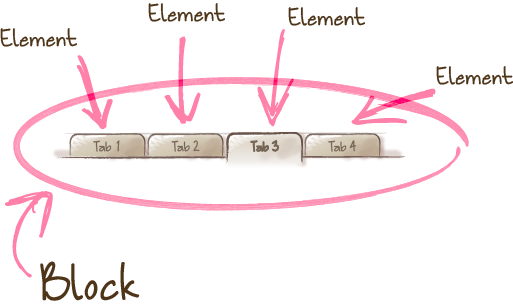
BEM 避免 选择器嵌套, 不然不可复用

block
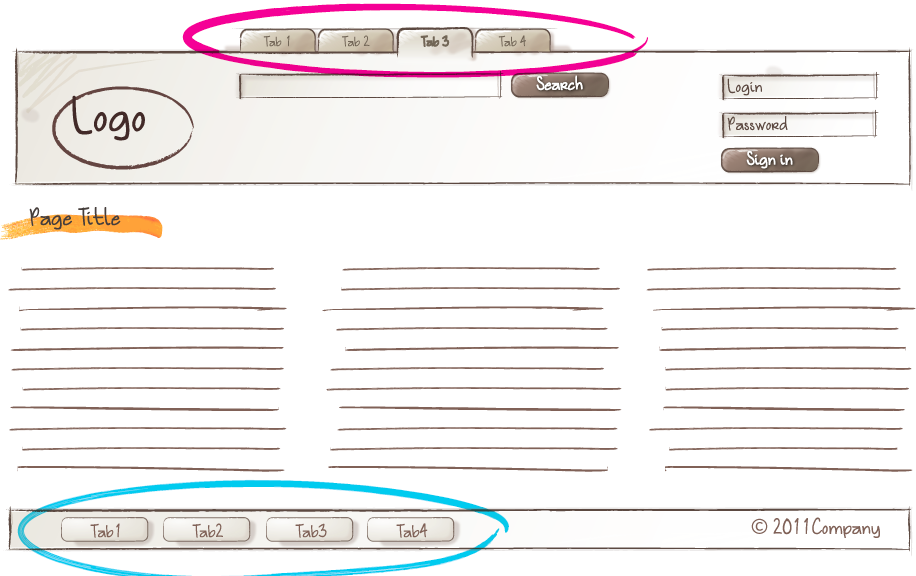
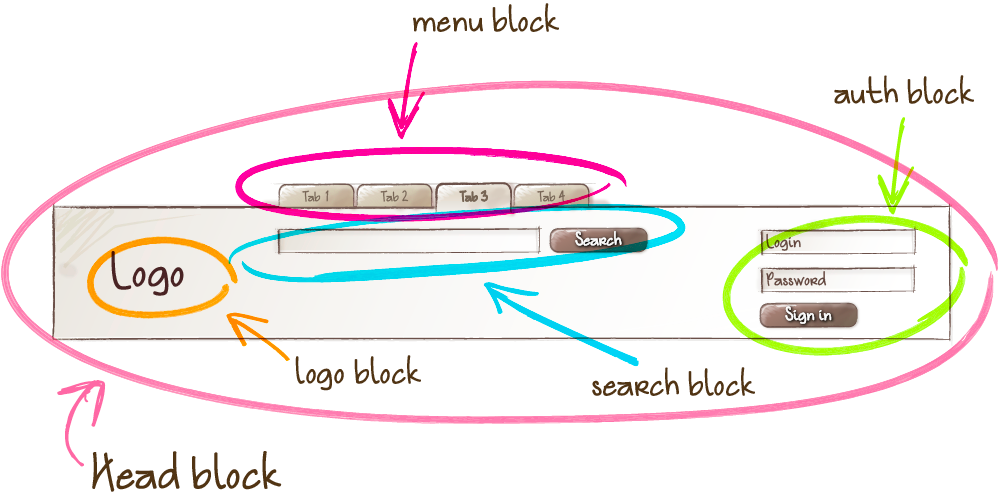
目的让 the logo and the authorization form 互相交换位置而不通过css 和js
1. Block: 通过class 设置块,是有意义的
不能影响它的环境,不能设置它的形状 边距等
[cc lang=”html”]

[/cc]
Block nesting 嵌套
可以嵌套 且可以嵌套多层
[cc lang=”html”]

[/cc]

2.Element
element
A composite part of a block that can’t be used separately from it.
Features:

The element name describes its purpose (“What is this?” — item, text, etc.), not its state (“What type, or what does it look like?” — red, big, etc.).

The structure of an element’s full name is block-name__element-name. The element name is separated from the block name with a double underscore (__).

[cc lang=”html”]


[/cc]
element nesting 元素嵌套
An element is always part of a block, not another element. This means that element names can’t define a hierarchy such as block__elem1__elem2.
[cc lang=”html”]


[/cc]
块是定义一个作用域, 确保所有元素element 在block的前缀之下, block__element 一定在 block 包围里

Not all blocks have elements. An element is an optional block component. 元素是个可选择的块
[cc lang=”html”]


[/cc]

Should I create a block or an element?
Create a block
If a section of code might be reused and it doesn’t depend on other page components being implemented.

Create an element
If a section of code can’t be used separately without the parent entity (the block).
The exception is elements that must be divided into smaller parts – subelements – in order to simplify development. In the BEM methodology, you can’t create elements of elements. In a case like this, instead of creating an element, you need to create a service block.

3.Modifier
modifier
The same block looks different due to the use of a modifier.
An entity that defines the appearance, state, or behavior of a block or element.
Features:

The modifier name describes its appearance (“What size?” or “Which theme?” and so on — size_s or theme_islands), its state (“How is it different from the others?” — disabled, focused, etc.) and its
以 _ 做分离
[cc lang=”html”]


[/cc]

Key-value
Used when the modifier value is important. For example, “a menu with the islands design theme”: menu_theme_islands.

The structure of the modifier’s full name follows the pattern:

block-name_modifier-name_modifier-value

block-name__element-name_modifier-name_modifier-value
[cc lang=”html”]


[/cc]

A modifier can’t be used alone,
[cc lang=”html”]correct

incorrent

[/cc]

BEM entity
Blocks, elements, and modifiers are all called BEM entities.

Mix
A technique for using different BEM entities on a single DOM node.

Mixes allow you to:
Combine the behavior and styles of multiple entities without duplicating code.
Create semantically new UI components based on existing ones.
Example
[cc lang=”html”]

[/cc]

File structure
[cc]search-form/ # Directory of the search-form

__input/ # Subdirectory of the search-form__input
search-form__input.css # CSS implementation of the
# search-form__input element
search-form__input.js # JavaScript implementation of the
# search-form__input element

__button/ # Subdirectory of the search-form__button
# element
search-form__button.css
search-form__button.js

_theme/ # Subdirectory of the search-form_theme
# modifier
search-form_theme_islands.css # CSS implementation of the search-form block
# that has the theme modifier with the value
# islands
search-form_theme_lite.css # CSS implementation of the search-form block
# that has the theme modifier with the value
# lite

search-form.css # CSS implementation of the search-form block
search-form.js # JavaScript implementation of the
# search-form block[/cc]

BEM tree
Let’s consider an example of a DOM tree:
[cc lang=”html”]


[/cc]
BEM xml

[cc lang=”xml”]


[/cc]

HTML implementation:
[cc lang=”html”]
//Positioning a block relative to other blocks


CSS implementation:

.page__header {
padding: 20px;
}

.page__footer {
padding: 50px;
}
[/cc]
Positioning elements inside a block
[cc lang=”html”]


CSS implementation:

.page__inner {
margin-right: auto;
margin-left: auto;
width: 960px;
}[/cc]

Naming 命名
[cc lang=”html”].button {}
.button__icon {}
.button__text {}
.button_theme_islands {}
[/cc]

Using HTML wrappers 使用包装
[cc lang=”html”]Positioning a block relative to other blocks


Positioning HTML elements inside a block

[/cc]

css字体设置

[cc lang=”css”]body {
font-family: -apple-system, BlinkMacSystemFont, “Segoe UI”, Roboto, Helvetica, Arial, sans-serif, “Apple Color Emoji”, “Segoe UI Emoji”, “Segoe UI Symbol”;
}[/cc]

-apple-system、BlinkMacSystemFont 是什么东东?根据 Webkit 博客,-apple-system 用于调用系统默认 UI 字体,并且会根据 font-weight 声明选择恰当的变体。system 将来有可能成为标准,-apple- 为过渡阶段的厂商前缀。

[cc lang=”css”]
body {
font-family:
/* 1 */ system, -apple-system, BlinkMacSystemFont,
/* 2 */ “Segoe UI”, “Roboto”, “Oxygen”, “Ubuntu”, “Cantarell”, “Fira Sans”, “Droid Sans”,
/* 3 */ “Helvetica Neue”, sans-serif;
}[/cc]
第一组映射系统 UI 字体:

-apple-system:macOS 和 iOS 平台的 Safari 指向 San Francisco,更老版本的 macOS 指向 Neue Helvetica 和 Lucida Grande(中文字体待验证)

BlinkMacSystemFont:为 macOS Chrome 应用系统 UI 字体,与上面等同

第二组定义已知的系统 UI 字体:

Segoe UI 面向 Windows 和 Windows Phone

Roboto Android 及 较新的 Chrome OS

Oxygen 面向 KDE、Ubuntu 等

Fira Sans 面向 Firefox OS

Droid Sans 面向老版本 Android

第三组回退处理:

Helvetica Neue El Capitan 之前的 macOS 系统 UI 字体
sans-serif 字体回退

考虑到中文字体,最终的列表可能是:
[cc lang=”css”]
body {
font-family:
system, -apple-system, BlinkMacSystemFont,
“PingFang SC”, “Segoe UI”, “Microsoft YaHei”, “wenquanyi micro hei”,”Hiragino Sans GB”, “Hiragino Sans GB W3”, “Roboto”, “Oxygen”, “Ubuntu”, “Cantarell”, “Fira Sans”, “Droid Sans”,
“Helvetica Neue”, Helvetica, Arial, sans-serif;

}[/cc]

关于平方
预先定义好,使用 “PingFang-SC” 引用,浏览器根据 font-weight 去选择不同的变体。
[cc lang=”css”]
@font-face {
font-family: “PingFang-SC”;
font-weight: 100;
src: local(“PingFang SC Thin”);
}

@font-face {
font-family: “PingFang-SC”;
font-weight: 300;
src: local(“PingFang SC Light”);
}

@font-face {
font-family: “PingFang-SC”;
font-weight: 400;
src: local(“PingFang SC Regular”);
}

@font-face {
font-family: “PingFang-SC”;
font-weight: 500;
src: local(“PingFang SC Medium”);
}

@font-face {
font-family: “PingFang-SC”;
font-weight: 700;
src: local(“PingFang SC Semibold”);
}

@font-face {
font-family: “PingFang-SC”;
font-weight: 800;
src: local(“PingFang SC Heavy”);
}

body {
font-family: “PingFang-SC”, sans-serif;
}[/cc]

希尔排序(Shell Sort)

该方法的基本思想是:设待排序元素序列有n个元素,首先取一个整数increment(小于n)作为间隔将全部元素分为increment个子序列,所有距离为increment的元素放在同一个子序列中,在每一个子序列中分别实行直接插入排序。然后缩小间隔increment,重复上述子序列划分和排序工作。直到最后取increment=1,将所有元素放在同一个子序列中排序为止。
由于开始时,increment的取值较大,每个子序列中的元素较少,排序速度较快,到排序后期increment取值逐渐变小,子序列中元素个数逐渐增多,但由于前面工作的基础,大多数元素已经基本有序,所以排序速度仍然很快。

关于希尔排序increment(增量)的取法。
增量increment的取法有各种方案。最初shell提出取increment=n/2向下取整,increment=increment/2向下取整,直到increment=1。但由于直到最后一步,在奇数位置的元素才会与偶数位置的元素进行比较,这样使用这个序列的效率会很低。后来Knuth提出取increment=n/3向下取整+1.还有人提出都取奇数为好,也有人提出increment互质为好。应用不同的序列会使希尔排序算法的性能有很大的差异。

[cc lang=”javascript”]
function shellSort(arr) {
var len = arr.length,
temp,
gap = 1;
console.time(‘希尔排序耗时:’);
while(gap < len/5) { //动态定义间隔序列 gap =gap*5+1; } for (gap; gap > 0; gap = Math.floor(gap/5)) {
for (var i = gap; i < len; i++) { temp = arr[i]; for (var j = i-gap; j >= 0 && arr[j] > temp; j-=gap) {
arr[j+gap] = arr[j];
}
arr[j+gap] = temp;
}
}
console.timeEnd(‘希尔排序耗时:’);
return arr;
}[/cc]

插入排序(Insertion Sort)

插入排序(Insertion-Sort)的算法描述是一种简单直观的排序算法。它的工作原理是通过构建有序序列,对于未排序数据,在已排序序列中从后向 前扫描,找到相应位置并插入。插入排序在实现上,通常采用in-place排序(即只需用到O(1)的额外空间的排序),因而在从后向前扫描过程中,需要 反复把已排序元素逐步向后挪位,为最新元素提供插入空间。
[cc lang=”javascript”]function(array){
for (var i = 1; i < array.length; i++) { var key = array[i]; //取出下一个元素,在已经排序的元素序列中从后向前扫描; var j = i - 1; while (j >= 0 && array[j] > key) { //如果已排序元素大于新元素;
array[j + 1] = array[j]; // 已排元素向右移一位,相当于让出j位留给新元素
j–;
}
array[j + 1] = key; // 如果已排元素array[j]= left; j–) { // left 右边依次向右移一位,包括left 也向右移
array[j + 1] = array[j];
}
array[left] = key; // 然后left 的位置留给新元素
}

return array;[/cc]